Microsoft 365 Outlook Integration
Register the Entra Application
Ensure your Entra application is set up with the necessary Microsoft Graph API permissions:
| API / Permissions name | Type |
|---|---|
| Mail.ReadWrite | Application |
| MailboxFolder.Read.All | Application |
| User.Read | Delegated |
Grant Admin Consent
In Entra, approve the delegated or application permissions for the mailbox access.
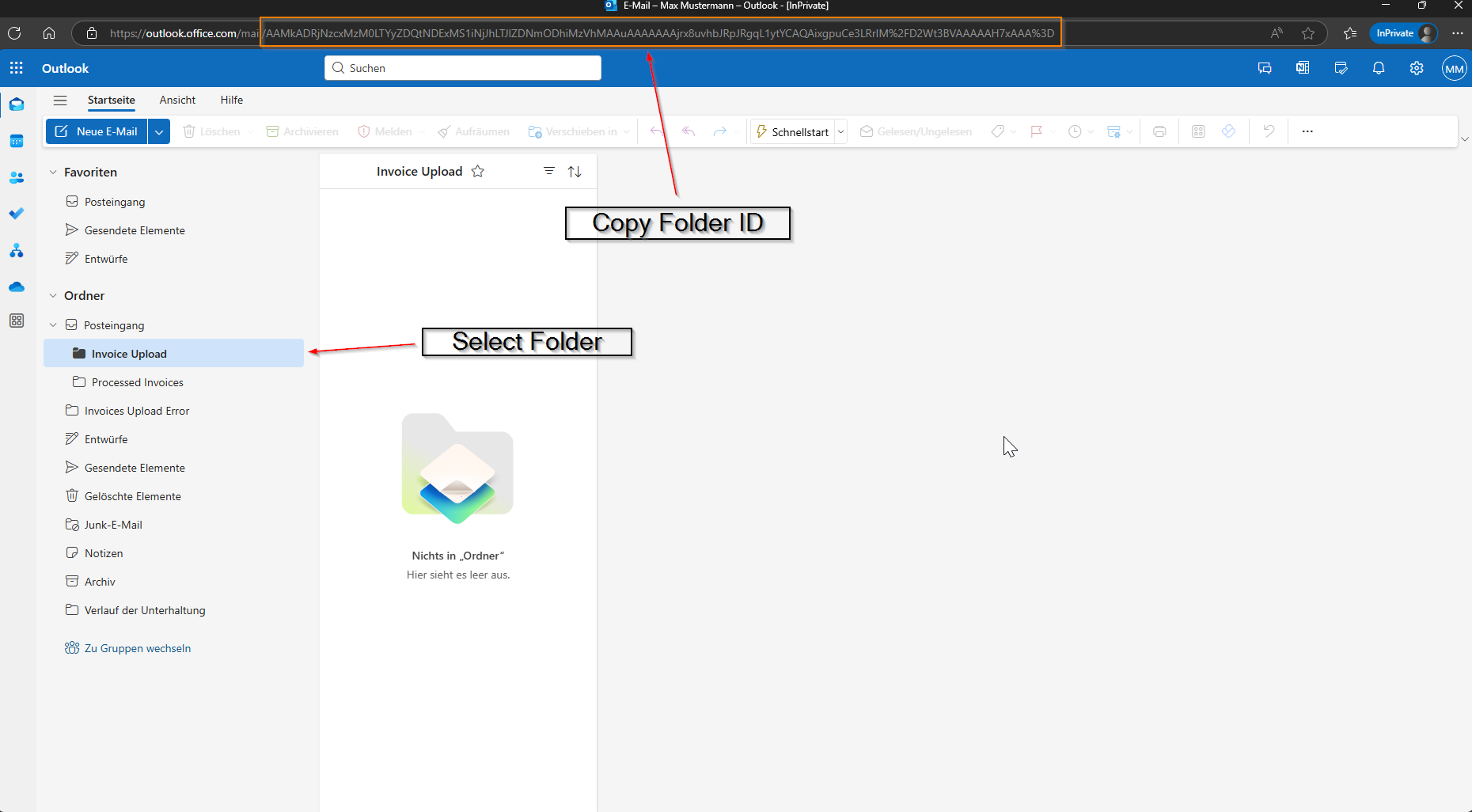
Obtain Outlook Folder IDs
You can obtain the folder ID by selecting and copying the folder ID from the URL.
Configure Mailbox
Add new mailbox configuration in the Admin portal and enter all required details.
| Field | Description |
|---|---|
| Name | Name of the configuration. |
| Email that that should be used. | |
| Inbox Folder ID | Folder from which emails should be read from. |
| Processed Folder ID | Where emails will be moved after they have been processed. |
| Unprocessable Folder ID | In case of any errors or if email is not processable, it will be moved to this folder. For example emails that have multiple invoices or attachments of the same type (PDF / XML) will not be processed. |
| Service | Select what service you would like to use, Classification or eInvoice or both. |
| Tenant ID | Entra Tenant ID |
| Domain | Entra Domain |
| Client ID | Entra Application Client ID |
| Client Secret | Entra Application Client Secret |
| Client Secret Expires | The date when Entra Application Client Secret expires. |
After you enter all required configuration details the service will automatically:
-
Connect to Microsoft Entra
It verifies the credentials and permissions by requesting an access token via Microsoft Graph. -
Fetch Folder Details
Using the provided folder IDs, the service queries Outlook to:- Confirm the folders exist and are accessible.
- Retrieve their display names.
-
Display Configuration Status
If the connection and folder lookup are successful:- Your new mailbox configuration will appear in the table.
- Each folder will show its display name.
- The status column will show
Online, indicating successful connection.