TA Documents Agent 1.x headless (current)
System Requirements
| Hardware | Value | Note |
|---|---|---|
| Memory | Min. 1 GB | Dedicated RAM for agent |
| Hard disk space | Min. 100 MB free space | For installation of the application and logs |
| Processor | x86 (32-bit) or x64 (64-bit) |
| Operating system | Version |
|---|---|
| Windows 10.x | |
| Windows 11.x | |
| Windows Server 2019 | Standard Edition 64 Bit Datacenter 64 Bit |
| Windows Server 2022 | Standard Edition 64 Bit Datacenter 64 Bit |
Installation Files
| Version | Mode | Features | Download |
|---|---|---|---|
| v1.11.0 | Headless |
| TA Documents Agent headless v1.11.0 |
IP addresses and domains
If you or your organization uses restrictive firewall or proxy server settings, you or your network administrator may need to allow specific domains and IP address ranges to ensure that Triumph-Adler Cloud products and related services function as expected.
For detailed information, refer to: IP Addresses and Domains.
Configuration
After installation, the service does not start automatically. It must first be configured via the configuration file %appdata%\TA Documents Agent\config.yml.
Start by selecting the account under which the service will run. The application data directory (appdata) of this account is then used to load the configuration.
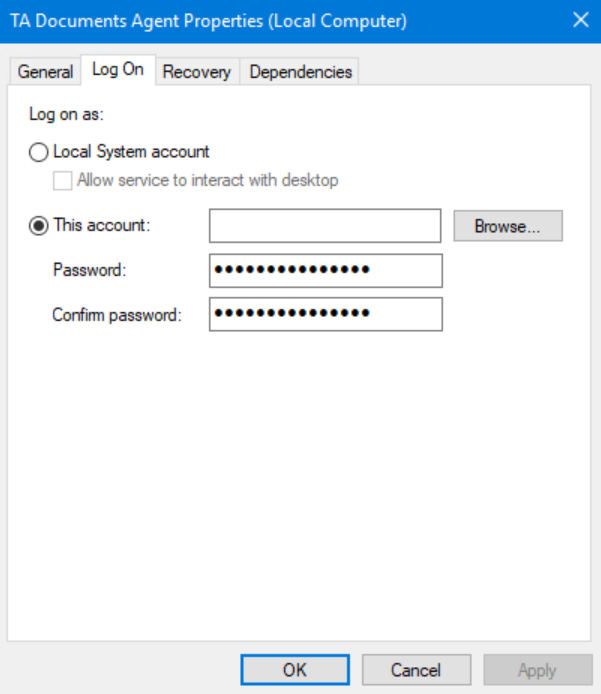
After configuration, you can choose to have the service start automatically or run it manually.
config.yml
| Field | Required | Description |
|---|---|---|
| accessToken | Yes | Access token generated via the Cloud Manager. The token is valid for 15 minutes. |
| refreshToken | Yes | Refresh token generated via the Cloud Manager. The token is valid for 30 days. |
| logLevel | Yes | Log level for the service, possible options: error, warning, debug, info. |
| invoice.upload.path | Yes | Upload folder (documents are uploaded from this folder). A UNC path is supported. |
| invoice.upload.type | Yes | Upload folder type, possible options: folder, SMB |
| invoice.upload.smbUsername | Yes, if invoice.upload.type is set to SMB | Username for authentication with the shared folder |
| invoice.upload.smbPassword | Yes, if invoice.upload.type is set to SMB | Password for authentication with the shared folder |
| invoice.download.downloadLocally | No | If this option is set to true, the download of classified/extracted documents (JSON and PDF file) is activated. |
| invoice.download.path | Yes | Download folder (classified/extracted documents are downloaded to this folder). A UNC path is supported. |
| invoice.download.skipIntegrations | No | If set to true, the transfer of classified/extracted documents to the “yuuvis RAD” service is deactivated. |
| deliveryNote.upload.path | Yes | Upload folder (documents are uploaded from this folder). A UNC path is supported. |
| deliveryNote.upload.type | Yes | Upload folder type, possible options: folder, SMB |
| deliveryNote.upload.smbUsername | Yes, if deliveryNote.upload.type is set to SMB | Username for authentication with the shared folder |
| deliveryNote.upload.smbPassword | Yes, if deliveryNote.upload.type is set to SMB | Password for authentication with the shared folder |
| deliveryNote.download.downloadLocally | No | If this option is set to true, the download document (PDF file) is activated. |
| deliveryNote.download.path | Yes | Download folder (PDF file is downloaded to this folder). A UNC path is supported. |
| deliveryNote.download.skipIntegrations | No | If set to true, the transfer of delivery note to the “yuuvis RAD” service is deactivated. |
| proxy.mode | Yes | Proxy mode (manual or use system proxy) |
| proxy.url | Yes, if invoice.upload.type is set to manual | URL and port of the proxy server, for example: http://proxy:8080 |
| proxy.username | Yes, if invoice.upload.type is set to manual | Username for authentication on the proxy server (3 notations: user@test.ag, test\user, user) |
| proxy.password | Yes, if invoice.upload.type is set to manual | Password for authentication on the proxy server |
The agent uses an SQLite database to store its configuration. Sensitive data is encrypted, and the encryption key is not accessible.
Command-Line parameters
The agent can be run from a terminal. The following parameters are available:
| Parameter | Type | Default | Description |
|---|---|---|---|
| -stage | bool | false | If set to true a stage-URL will be used. |
| -url | string | "" | If provided, will be used as server-URL. |
| -enc | string | "" | If provided, it will encrypt the string and output it in the terminal. The encrypted string can be used in config.yml.Supported encrypted fields are:
|
Logging
The client log file logs.txt is located in the folder %AppData%\TA Documents Agent\logs.
Log Retention
- Once the log file reaches 100 MB, a backup file named
logs-timestamp.logis created. - Backup files older than 28 days are deleted automatically.
- Up to three backup files are retained.
Status Codes
| Code | Description |
|---|---|
| 200 | OK |
| 400 | Bad request |
| 401 | Unauthorized |
| 500 | Internal server error |
Changelog
| Version | Date | Description |
|---|---|---|
| v1.11.0 | 23.01.2026 | Feat
|
| v1.10.0 | 29.12.2025 | Feat
|
| v1.9.1 | 26.11.2025 | Fix
|
| v1.9.0 | 26.11.2025 | Feat
|
| v1.8.0 | 25.03.2025 | Feat
|
| v1.7.0 | 09.08.2024 | Chore
|
| v1.6.1 | 21.06.2024 | Fix
|
| v1.6.0 | 20.06.2024 | Feat
|
| v1.5.0 | 26.04.2024 | Chore
|
| v1.4.1 | 27.03.2024 | Fix
|
| v1.4.0 | 29.02.2024 | Feat
|
| v1.3.0 | 15.02.2024 | Feat
|
| v1.2.0 | 11.01.2024 | Feat
|
| v1.1.0 | 08.12.2023 | Feat
|
| v1.0.0 | 04.12.2023 | Feat
|